ShopDreamUp AI ArtDreamUp
Deviation Actions
Daily Deviation
Daily Deviation
January 13, 2013
"this guy pushed the limits of the rainmeter skins as far as amount of details and transitions goes." Cogs, Tubes 'n' Gauges by ~Mordasius
Featured by neiio
Suggested by LukasKokoska


Techy Wallpapers
10 Subscribers
So you like Techy Stuff, eh? Here you will have access to my techy wallpapers including huds cocepts.
$1/month


Suggested Deviants


Suggested Collections


You Might Like…


Featured in Groups




Description
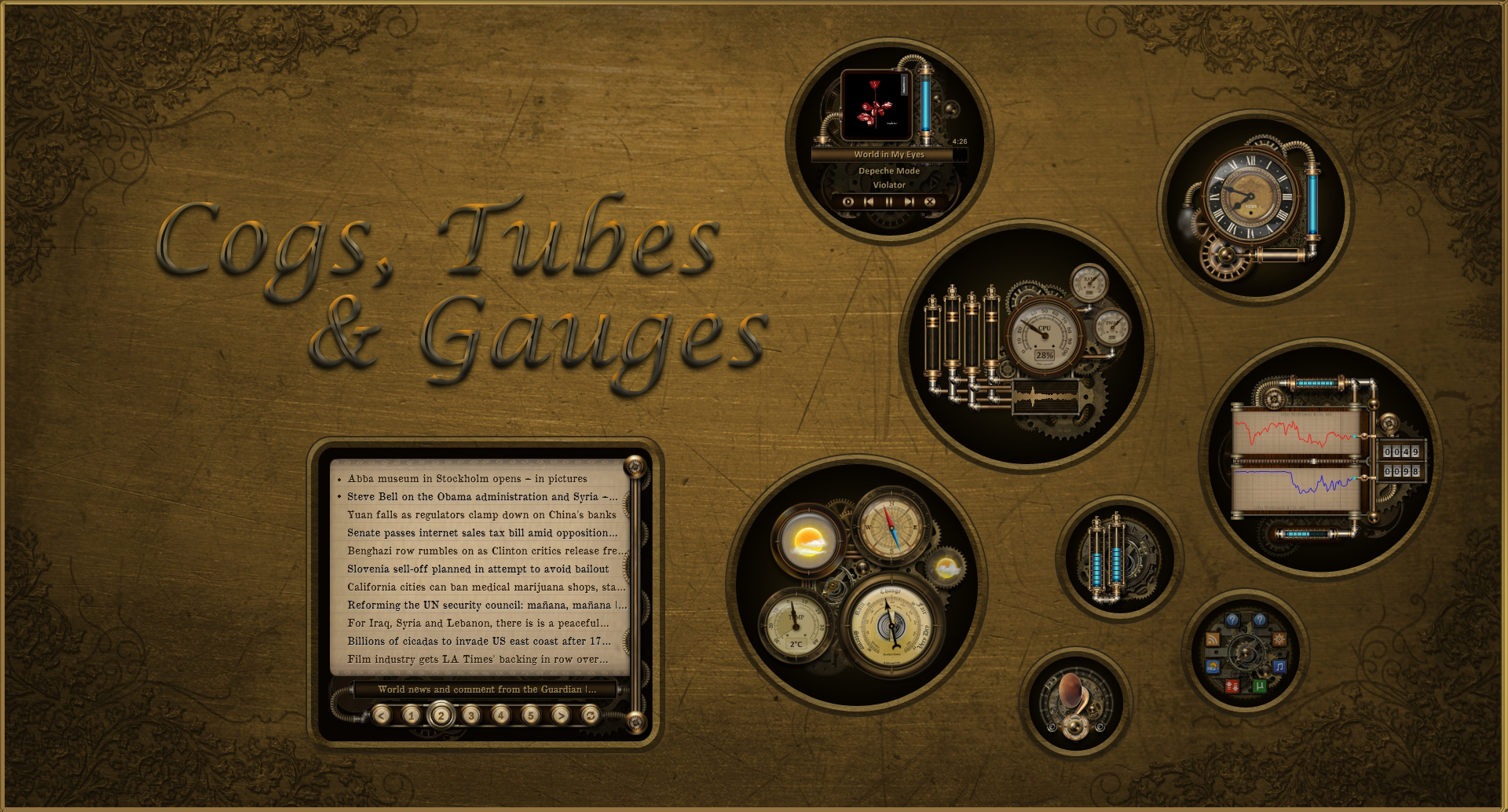
This collection of rainmeter skins uses tubes, gauges and tooltips to display information. Most of the skins have twirling cogs or other gizmos to add a little movement to your desktop but none of them use much in the way of CPU or RAM resources. You will need the latest beta version of Rainmeter to run these skins. Get it from rainmeter.net
The skins in this version are:
- Analog clock (left-click to change the clock face or left-click on the tube to change the colour of all tubes in all skins of the collection) - watch for the steam emission every minute.
- System info with a gauge showing overall CPU usage, individual bars for up to 8 cores and smaller gauges for RAM and SWAP memory usage.
- Network activity showing upload and download speeds along with the ping return time and wifi signal strength.
- Volume control - use the mouse scroll wheel to adjust the system volume.
- Hard Disks - gauges for used space on 1-4 hard drives (gratuitous pendulum thinga-me-bob for one or two disks).
- Weather skin with analog gauges for temperature, barometric pressure and wind direction. Click the forecast icon for a 72-hour forecast from the Weather Channel. To change the weather location you need to right-click anywhere on the weather skin -> left-click on Weather Settings -> edit the settings in WeatherComJSONVariables.inc -> save and close the editor -> middle click anywhere on the skin to refresh the settings.
- uTorrent tracker using Lua script adapted from LuaTorrent 3.1 by JS Morley
- RSS Feedreader built around Kaelri's Reader.lua script . Feed items are sorted by date/time and anything less than an hour old is bulleted. The neat little selector animation uses Kaelri's Universal Transitions script .
- Music Player that works with a variety of media players (e.g. Windows Media Player, AIMP, Foobar2000, iTunes, MediaMonkey, MusicBee, Media Player, Classic, WinAmp, Spotify, TTplayer, VLC, Zune, etc.).
- Skin Launcher for the FeedReader, Weather, Network, Music Player and uTorrent skins.
NOTE: Click the settings icon in the two-o'clock position on the Skin Launcher to open the CogsTubesGauges@ResourcesConfigsUserVariables.inc file where various user settings are stored.
The collection is intended for use on widescreen resolutions and the rmskin includes a 1920x1080 version of the wallpaper shown. If you don't fancy the black/gold background to the skins you can change to a transparent background in the UserVariables.inc file.
If you have any suggestions or questions concerning the skins, you'll get a quicker response if you contact me on the Rainmeter forums .
UPDATE 20th January 2013 - Added a skin variant to show CPU usage on up to 8 cores.
UPDATE 27th January 2013 - Added circular variants for the volume control and skin launcher skins.
The skins in this version are:
- Analog clock (left-click to change the clock face or left-click on the tube to change the colour of all tubes in all skins of the collection) - watch for the steam emission every minute.
- System info with a gauge showing overall CPU usage, individual bars for up to 8 cores and smaller gauges for RAM and SWAP memory usage.
- Network activity showing upload and download speeds along with the ping return time and wifi signal strength.
- Volume control - use the mouse scroll wheel to adjust the system volume.
- Hard Disks - gauges for used space on 1-4 hard drives (gratuitous pendulum thinga-me-bob for one or two disks).
- Weather skin with analog gauges for temperature, barometric pressure and wind direction. Click the forecast icon for a 72-hour forecast from the Weather Channel. To change the weather location you need to right-click anywhere on the weather skin -> left-click on Weather Settings -> edit the settings in WeatherComJSONVariables.inc -> save and close the editor -> middle click anywhere on the skin to refresh the settings.
- uTorrent tracker using Lua script adapted from LuaTorrent 3.1 by JS Morley
- RSS Feedreader built around Kaelri's Reader.lua script . Feed items are sorted by date/time and anything less than an hour old is bulleted. The neat little selector animation uses Kaelri's Universal Transitions script .
- Music Player that works with a variety of media players (e.g. Windows Media Player, AIMP, Foobar2000, iTunes, MediaMonkey, MusicBee, Media Player, Classic, WinAmp, Spotify, TTplayer, VLC, Zune, etc.).
- Skin Launcher for the FeedReader, Weather, Network, Music Player and uTorrent skins.
NOTE: Click the settings icon in the two-o'clock position on the Skin Launcher to open the CogsTubesGauges@ResourcesConfigsUserVariables.inc file where various user settings are stored.
The collection is intended for use on widescreen resolutions and the rmskin includes a 1920x1080 version of the wallpaper shown. If you don't fancy the black/gold background to the skins you can change to a transparent background in the UserVariables.inc file.
If you have any suggestions or questions concerning the skins, you'll get a quicker response if you contact me on the Rainmeter forums .
UPDATE 20th January 2013 - Added a skin variant to show CPU usage on up to 8 cores.
UPDATE 27th January 2013 - Added circular variants for the volume control and skin launcher skins.
UPDATE 2nd December 2020 - Updated the weather skin to incorporate the latest patches by jsmorley.
UPDATE 21st June 2022 - Updated the weather skin API.
Comments172
Join the community to add your comment. Already a deviant? Log In

Excellent skin, thank you very much! 😊
It works perfectly!